> ## Documentation Index
> Fetch the complete documentation index at: https://docs.irisagent.com/llms.txt
> Use this file to discover all available pages before exploring further.
# Chatbot on Website
> Deploy IrisAgent as a Chatbot
## **Introduction**
IrisAgent's customizable chatbot can be deployed on any website to answer support questions. This chatbot is designed to enhance customer support and provide instant assistance to website visitors. Here are the key features and capabilities:
1. **Customizability**: The chatbot can be fully customized to match your brand's identity. You can customize the chatbot's appearance, including its colors, fonts, and overall design, to seamlessly integrate it into your website.
2. **Branding and Logo**: You have the ability to add your brand's logo to the chatbot interface, ensuring a consistent visual representation of your company's identity throughout the customer experience.
3. **Welcome Message**: You can create a personalized welcome message that will greet visitors as soon as they initiate a conversation with the chatbot. This message can be tailored to introduce your brand, set expectations, and guide users on how to get the support they need.
4. **Support Question Handling**: The chatbot is equipped to handle a wide range of support questions and provide relevant answers in real-time. It utilizes natural language processing (NLP) and machine learning techniques to understand user inquiries and respond accurately.
5. **Analytics and Insights**: The chatbot provides detailed analytics and insights into user interactions, allowing you to understand customer behavior, identify frequently asked questions, and optimize the chatbot's performance over time.
## **Getting Started and Integration Guide**
1. Go to the **Configure** page under **IrisGPT** to configure and embed the IrisAgent chatbot.
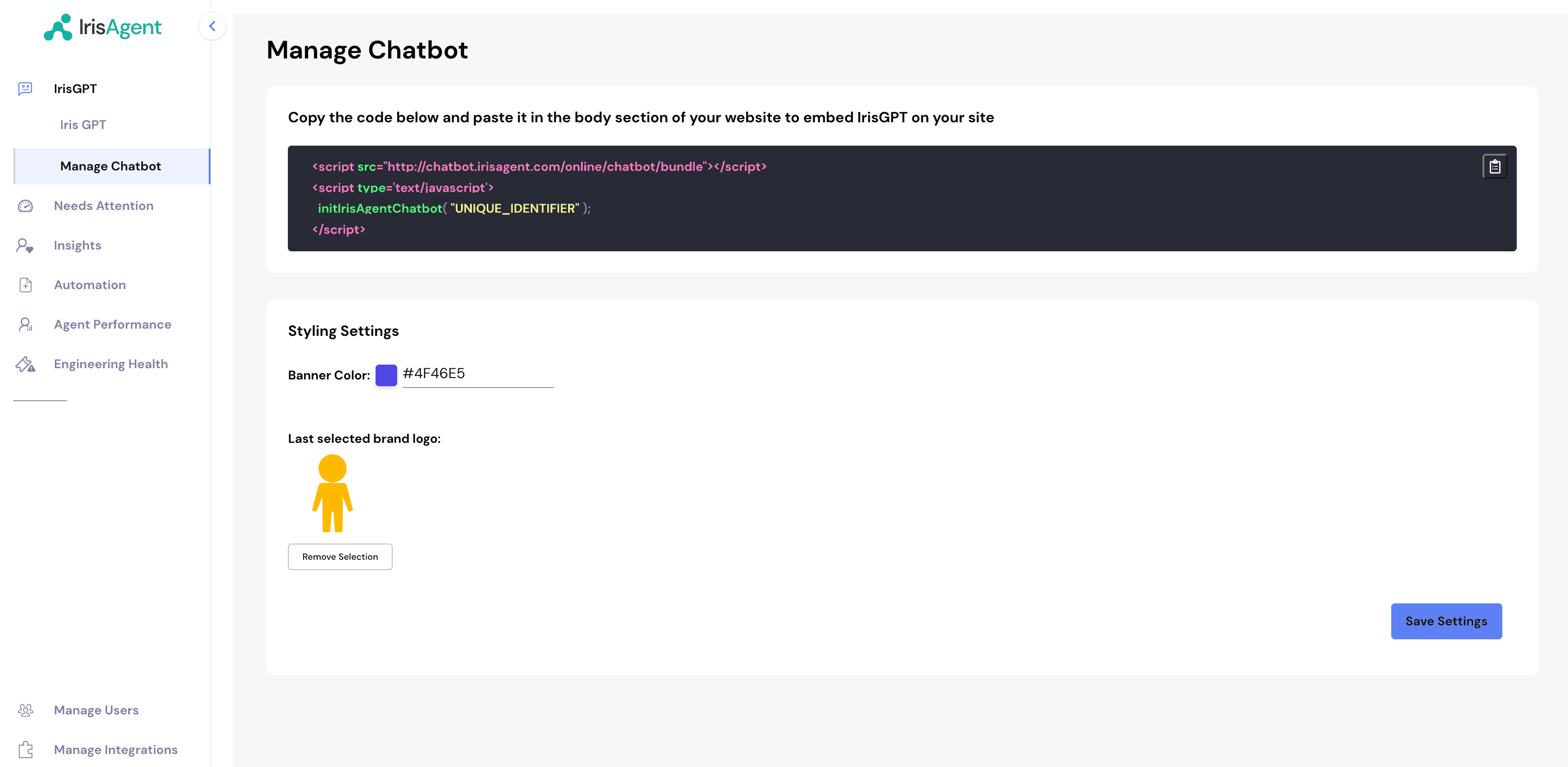 2. Customize the chatbot (brand color, logo, welcome message, behavior, and more) using the settings described in [Configuration options](#configuration-options) below.
3. Click **Get Code** and paste the snippet into the **body** section of your website.
```html theme={null}
```
4. You can see all the conversations that happened on the chatbot on the **Conversations** page under **IrisGPT**.
5. That's it, done! You should be seeing the IrisAgent chatbot on your website.
## **Configuration options**
You can configure the chatbot in two ways:
* **From the Configure page** (recommended for most users): edit the common settings through the dashboard UI. No code required.
* **From the embed snippet** (advanced): pass a full theme object via a `data-theme` attribute to control every visual detail. See [Advanced theming](#advanced-theming).
### Settings on the Configure page
These options are available on the chatbot **Configure** page in the dashboard.
| Setting | Description | Default |
| ------------------------- | ---------------------------------------------------------------------------------------------------------------------------------------------------------------------- | ---------------------------------------------------------------------- |
| **Configuration name** | Internal name for this chatbot configuration. | — |
| **Banner color** | Primary brand color used for the launcher button and accents. | `#0cb49e` |
| **Brand logo** | Your logo, shown in the chat window header. Upload a PNG/SVG/JPG (max 2 MB) or provide a URL. | IrisAgent logo |
| **Welcome message** | The first message visitors see when they open the chat. | `Hello! 👋 Welcome to our support thread. How can I assist you today?` |
| **Auto-open chat window** | When **on**, the chat window expands automatically on page load. When **off**, visitors see only the collapsed launcher button until they click it. | On |
| **Agent handoff** | What happens when a visitor needs a human: send the support team's contact details, open a support ticket, or start a live chat. Includes an optional handoff message. | None |
| **AI response style** | Custom guidelines for how the AI should respond (tone, phrasing, formatting). Up to 2,000 characters. | — |
| **Language** | Force a fixed conversation language. If unset, the chatbot translates dynamically. | Auto (dynamic translation) |
| **Product ID** | Optionally scope this chatbot to a specific product. | — |
**Auto-open** controls whether the chatbot starts expanded or collapsed. Turning it
off is useful when you want a less intrusive experience and prefer visitors to open
the chat themselves. By default the window auto-opens on desktop only.
Only set a **Product ID** if you have a matching Product ID configured for your
articles (under **Settings → Article Product Classifier**). Otherwise, chats may
return no answer. See [Product Segmentation](/configuring-ai-and-automation/Product-Segmentation).
### Advanced theming
For full control over the chatbot's appearance and behavior, pass a theme object to the embed snippet using the `data-theme` attribute. The value is your theme JSON, **Base64-encoded**.
To produce the value, take the theme JSON shown below and Base64-encode it (for
example, `btoa(JSON.stringify(theme))` in a browser console), then place the result
in `data-theme`. Any field you omit falls back to the IrisAgent default.
```html theme={null}
```
A theme object has the following top-level sections. Each is optional.
```json theme={null}
{
"button": { "...": "launcher button & auto-open" },
"tooltip": { "...": "proactive message bubble" },
"chatWindow": { "...": "chat window, messages, input, footer" },
"form": { "...": "lead/contact form colors" },
"disclaimer": { "...": "consent pop-up" },
"customCSS": "advanced CSS overrides"
}
```
#### Launcher button (`button`)
Controls the floating button and whether the window opens on its own.
| Option | Description | Default |
| --------------------------------- | -------------------------------------------------- | -------------- |
| `backgroundColor` | Button background color. | `#0cb49e` |
| `iconColor` | Button icon color. | `white` |
| `customIconSrc` | URL of a custom launcher icon. | IrisAgent icon |
| `size` | `small`, `medium`, `large`, or a number of pixels. | `48` |
| `bottom` | Distance from the bottom of the screen, in pixels. | `20` |
| `right` | Distance from the right of the screen, in pixels. | `20` |
| `dragAndDrop` | Allow visitors to drag the button. | `true` |
| `autoWindowOpen.autoOpen` | Auto-expand the chat window on page load. | `true` |
| `autoWindowOpen.openDelay` | Delay before auto-opening, in seconds. | `0` |
| `autoWindowOpen.autoOpenOnMobile` | Also auto-open on mobile devices. | `false` |
#### Proactive message (`tooltip`)
A short message bubble shown next to the launcher when the chat is collapsed.
| Option | Description | Default |
| ------------------------ | ---------------------------------- | --------------------- |
| `showTooltip` | Show the proactive message bubble. | `true` |
| `tooltipMessage` | The bubble text. | `Hi, how can I help?` |
| `tooltipBackgroundColor` | Bubble background color. | `#0cb49e90` |
| `tooltipTextColor` | Bubble text color. | `white` |
| `tooltipFontSize` | Bubble font size, in pixels. | `12` |
#### Chat window (`chatWindow`)
| Option | Description | Default |
| ----------------------- | --------------------------------------------- | ------------------ |
| `title` | Header title. | `Chat with Us` |
| `titleAvatarSrc` | Header avatar image URL. | IrisAgent logo |
| `titleTextColor` | Header text color. | `#303235` |
| `titleBackgroundColor` | Header background color. | `white` |
| `showTitle` | Show the header bar. | `true` |
| `welcomeMessage` | First bot greeting. | `Hello! 👋 ...` |
| `errorMessage` | Message shown when a request fails. | Default error text |
| `backgroundColor` | Chat window background color. | `#ffffff` |
| `backgroundImage` | Background image URL. | none |
| `height` | Window height, in pixels. | `700` |
| `width` | Window width, in pixels. | `400` |
| `fontSize` | Base font size, in pixels. | `14` |
| `starterPrompts` | Array of suggested prompts shown to visitors. | `[]` |
| `starterPromptFontSize` | Starter prompt font size, in pixels. | `15` |
| `clearChatOnReload` | Reset the conversation on page reload. | `false` |
| `renderHTML` | Render HTML in bot responses. | `true` |
| `showAgentMessages` | Show agent reasoning steps (for agent flows). | `true` |
| `sourceDocsTitle` | Heading shown above cited sources. | `Sources:` |
| `poweredByTextColor` | Color of the "powered by" text. | — |
#### Message input (`chatWindow.textInput`)
| Option | Description | Default |
| ------------------------ | ---------------------------------------------- | -------------------- |
| `placeholder` | Input placeholder text. | `Type your question` |
| `backgroundColor` | Input background color. | `#ffffff` |
| `textColor` | Input text color. | `#303235` |
| `sendButtonColor` | Send button color. | `#3B81F6` |
| `maxChars` | Maximum characters per message. | `500` |
| `maxCharsWarningMessage` | Warning shown when the limit is exceeded. | Default warning text |
| `autoFocus` | Focus the input when the chat opens. | `true` |
| `sendMessageSound` | Play a sound when the visitor sends a message. | `true` |
| `sendSoundLocation` | URL of the send sound. | Default sound |
| `receiveMessageSound` | Play a sound when a reply arrives. | `true` |
| `receiveSoundLocation` | URL of the receive sound. | Default sound |
#### Messages (`chatWindow.userMessage`, `chatWindow.botMessage`)
| Option | Description | Default (bot / user) |
| ----------------- | -------------------------------- | --------------------- |
| `backgroundColor` | Message bubble background. | `#f5f5f5` / `#0cb49e` |
| `textColor` | Message text color. | `#303235` / `#ffffff` |
| `showAvatar` | Show an avatar next to messages. | `true` / — |
| `avatarSrc` | Avatar image URL. | IrisAgent logo / — |
#### Footer (`chatWindow.footer`)
| Option | Description | Default |
| ------------- | --------------------------------- | ----------------------- |
| `showFooter` | Show the footer. | `true` |
| `text` | Footer text. | `Powered by` |
| `company` | Company name shown in the footer. | — |
| `companyLink` | Link for the company name. | `https://irisagent.com` |
| `textColor` | Footer text color. | `#303235` |
#### Other sections
| Section / option | Description | Default |
| -------------------------------- | ------------------------------------------------------------------------------------------------------------------------------------------------------------------------------------------------------------------- | ------------------ |
| `chatWindow.feedback.color` | Color of the thumbs up/down feedback icons. | `#3B81F6` |
| `chatWindow.dateTimeToggle.date` | Show the date on messages. | `true` |
| `chatWindow.dateTimeToggle.time` | Show the time on messages. | `true` |
| `form.backgroundColor` | Background color of lead/contact forms. | `white` |
| `form.textColor` | Text color of lead/contact forms. | `black` |
| `disclaimer` | Consent pop-up shown before chatting. Supports `title`, `message`, `textColor`, `backgroundColor`, `buttonText`, `buttonColor`, `buttonTextColor`, `denyButtonText`, `denyButtonBgColor`, `blurredBackgroundColor`. | Disabled |
| `customCSS` | Raw CSS string for advanced visual overrides. | IrisAgent defaults |
### Full example
```json theme.json theme={null}
{
"button": {
"backgroundColor": "#0cb49e",
"iconColor": "white",
"size": 48,
"bottom": 20,
"right": 20,
"dragAndDrop": true,
"autoWindowOpen": {
"autoOpen": true,
"openDelay": 2,
"autoOpenOnMobile": false
}
},
"tooltip": {
"showTooltip": true,
"tooltipMessage": "Hi, how can I help?",
"tooltipBackgroundColor": "#0cb49e90",
"tooltipTextColor": "white",
"tooltipFontSize": 12
},
"chatWindow": {
"title": "Chat with Us",
"welcomeMessage": "Hello! 👋 How can I help you today?",
"starterPrompts": ["How do I reset my password?", "Track my order"],
"textInput": {
"placeholder": "Type your question",
"maxChars": 500
}
}
}
```
```html embed.html theme={null}
```
2. Customize the chatbot (brand color, logo, welcome message, behavior, and more) using the settings described in [Configuration options](#configuration-options) below.
3. Click **Get Code** and paste the snippet into the **body** section of your website.
```html theme={null}
```
4. You can see all the conversations that happened on the chatbot on the **Conversations** page under **IrisGPT**.
5. That's it, done! You should be seeing the IrisAgent chatbot on your website.
## **Configuration options**
You can configure the chatbot in two ways:
* **From the Configure page** (recommended for most users): edit the common settings through the dashboard UI. No code required.
* **From the embed snippet** (advanced): pass a full theme object via a `data-theme` attribute to control every visual detail. See [Advanced theming](#advanced-theming).
### Settings on the Configure page
These options are available on the chatbot **Configure** page in the dashboard.
| Setting | Description | Default |
| ------------------------- | ---------------------------------------------------------------------------------------------------------------------------------------------------------------------- | ---------------------------------------------------------------------- |
| **Configuration name** | Internal name for this chatbot configuration. | — |
| **Banner color** | Primary brand color used for the launcher button and accents. | `#0cb49e` |
| **Brand logo** | Your logo, shown in the chat window header. Upload a PNG/SVG/JPG (max 2 MB) or provide a URL. | IrisAgent logo |
| **Welcome message** | The first message visitors see when they open the chat. | `Hello! 👋 Welcome to our support thread. How can I assist you today?` |
| **Auto-open chat window** | When **on**, the chat window expands automatically on page load. When **off**, visitors see only the collapsed launcher button until they click it. | On |
| **Agent handoff** | What happens when a visitor needs a human: send the support team's contact details, open a support ticket, or start a live chat. Includes an optional handoff message. | None |
| **AI response style** | Custom guidelines for how the AI should respond (tone, phrasing, formatting). Up to 2,000 characters. | — |
| **Language** | Force a fixed conversation language. If unset, the chatbot translates dynamically. | Auto (dynamic translation) |
| **Product ID** | Optionally scope this chatbot to a specific product. | — |
**Auto-open** controls whether the chatbot starts expanded or collapsed. Turning it
off is useful when you want a less intrusive experience and prefer visitors to open
the chat themselves. By default the window auto-opens on desktop only.
Only set a **Product ID** if you have a matching Product ID configured for your
articles (under **Settings → Article Product Classifier**). Otherwise, chats may
return no answer. See [Product Segmentation](/configuring-ai-and-automation/Product-Segmentation).
### Advanced theming
For full control over the chatbot's appearance and behavior, pass a theme object to the embed snippet using the `data-theme` attribute. The value is your theme JSON, **Base64-encoded**.
To produce the value, take the theme JSON shown below and Base64-encode it (for
example, `btoa(JSON.stringify(theme))` in a browser console), then place the result
in `data-theme`. Any field you omit falls back to the IrisAgent default.
```html theme={null}
```
A theme object has the following top-level sections. Each is optional.
```json theme={null}
{
"button": { "...": "launcher button & auto-open" },
"tooltip": { "...": "proactive message bubble" },
"chatWindow": { "...": "chat window, messages, input, footer" },
"form": { "...": "lead/contact form colors" },
"disclaimer": { "...": "consent pop-up" },
"customCSS": "advanced CSS overrides"
}
```
#### Launcher button (`button`)
Controls the floating button and whether the window opens on its own.
| Option | Description | Default |
| --------------------------------- | -------------------------------------------------- | -------------- |
| `backgroundColor` | Button background color. | `#0cb49e` |
| `iconColor` | Button icon color. | `white` |
| `customIconSrc` | URL of a custom launcher icon. | IrisAgent icon |
| `size` | `small`, `medium`, `large`, or a number of pixels. | `48` |
| `bottom` | Distance from the bottom of the screen, in pixels. | `20` |
| `right` | Distance from the right of the screen, in pixels. | `20` |
| `dragAndDrop` | Allow visitors to drag the button. | `true` |
| `autoWindowOpen.autoOpen` | Auto-expand the chat window on page load. | `true` |
| `autoWindowOpen.openDelay` | Delay before auto-opening, in seconds. | `0` |
| `autoWindowOpen.autoOpenOnMobile` | Also auto-open on mobile devices. | `false` |
#### Proactive message (`tooltip`)
A short message bubble shown next to the launcher when the chat is collapsed.
| Option | Description | Default |
| ------------------------ | ---------------------------------- | --------------------- |
| `showTooltip` | Show the proactive message bubble. | `true` |
| `tooltipMessage` | The bubble text. | `Hi, how can I help?` |
| `tooltipBackgroundColor` | Bubble background color. | `#0cb49e90` |
| `tooltipTextColor` | Bubble text color. | `white` |
| `tooltipFontSize` | Bubble font size, in pixels. | `12` |
#### Chat window (`chatWindow`)
| Option | Description | Default |
| ----------------------- | --------------------------------------------- | ------------------ |
| `title` | Header title. | `Chat with Us` |
| `titleAvatarSrc` | Header avatar image URL. | IrisAgent logo |
| `titleTextColor` | Header text color. | `#303235` |
| `titleBackgroundColor` | Header background color. | `white` |
| `showTitle` | Show the header bar. | `true` |
| `welcomeMessage` | First bot greeting. | `Hello! 👋 ...` |
| `errorMessage` | Message shown when a request fails. | Default error text |
| `backgroundColor` | Chat window background color. | `#ffffff` |
| `backgroundImage` | Background image URL. | none |
| `height` | Window height, in pixels. | `700` |
| `width` | Window width, in pixels. | `400` |
| `fontSize` | Base font size, in pixels. | `14` |
| `starterPrompts` | Array of suggested prompts shown to visitors. | `[]` |
| `starterPromptFontSize` | Starter prompt font size, in pixels. | `15` |
| `clearChatOnReload` | Reset the conversation on page reload. | `false` |
| `renderHTML` | Render HTML in bot responses. | `true` |
| `showAgentMessages` | Show agent reasoning steps (for agent flows). | `true` |
| `sourceDocsTitle` | Heading shown above cited sources. | `Sources:` |
| `poweredByTextColor` | Color of the "powered by" text. | — |
#### Message input (`chatWindow.textInput`)
| Option | Description | Default |
| ------------------------ | ---------------------------------------------- | -------------------- |
| `placeholder` | Input placeholder text. | `Type your question` |
| `backgroundColor` | Input background color. | `#ffffff` |
| `textColor` | Input text color. | `#303235` |
| `sendButtonColor` | Send button color. | `#3B81F6` |
| `maxChars` | Maximum characters per message. | `500` |
| `maxCharsWarningMessage` | Warning shown when the limit is exceeded. | Default warning text |
| `autoFocus` | Focus the input when the chat opens. | `true` |
| `sendMessageSound` | Play a sound when the visitor sends a message. | `true` |
| `sendSoundLocation` | URL of the send sound. | Default sound |
| `receiveMessageSound` | Play a sound when a reply arrives. | `true` |
| `receiveSoundLocation` | URL of the receive sound. | Default sound |
#### Messages (`chatWindow.userMessage`, `chatWindow.botMessage`)
| Option | Description | Default (bot / user) |
| ----------------- | -------------------------------- | --------------------- |
| `backgroundColor` | Message bubble background. | `#f5f5f5` / `#0cb49e` |
| `textColor` | Message text color. | `#303235` / `#ffffff` |
| `showAvatar` | Show an avatar next to messages. | `true` / — |
| `avatarSrc` | Avatar image URL. | IrisAgent logo / — |
#### Footer (`chatWindow.footer`)
| Option | Description | Default |
| ------------- | --------------------------------- | ----------------------- |
| `showFooter` | Show the footer. | `true` |
| `text` | Footer text. | `Powered by` |
| `company` | Company name shown in the footer. | — |
| `companyLink` | Link for the company name. | `https://irisagent.com` |
| `textColor` | Footer text color. | `#303235` |
#### Other sections
| Section / option | Description | Default |
| -------------------------------- | ------------------------------------------------------------------------------------------------------------------------------------------------------------------------------------------------------------------- | ------------------ |
| `chatWindow.feedback.color` | Color of the thumbs up/down feedback icons. | `#3B81F6` |
| `chatWindow.dateTimeToggle.date` | Show the date on messages. | `true` |
| `chatWindow.dateTimeToggle.time` | Show the time on messages. | `true` |
| `form.backgroundColor` | Background color of lead/contact forms. | `white` |
| `form.textColor` | Text color of lead/contact forms. | `black` |
| `disclaimer` | Consent pop-up shown before chatting. Supports `title`, `message`, `textColor`, `backgroundColor`, `buttonText`, `buttonColor`, `buttonTextColor`, `denyButtonText`, `denyButtonBgColor`, `blurredBackgroundColor`. | Disabled |
| `customCSS` | Raw CSS string for advanced visual overrides. | IrisAgent defaults |
### Full example
```json theme.json theme={null}
{
"button": {
"backgroundColor": "#0cb49e",
"iconColor": "white",
"size": 48,
"bottom": 20,
"right": 20,
"dragAndDrop": true,
"autoWindowOpen": {
"autoOpen": true,
"openDelay": 2,
"autoOpenOnMobile": false
}
},
"tooltip": {
"showTooltip": true,
"tooltipMessage": "Hi, how can I help?",
"tooltipBackgroundColor": "#0cb49e90",
"tooltipTextColor": "white",
"tooltipFontSize": 12
},
"chatWindow": {
"title": "Chat with Us",
"welcomeMessage": "Hello! 👋 How can I help you today?",
"starterPrompts": ["How do I reset my password?", "Track my order"],
"textInput": {
"placeholder": "Type your question",
"maxChars": 500
}
}
}
```
```html embed.html theme={null}
```